Bring Box-powered

document workflows

into HubSpot

Box Connector by SparkGrid helps teams manage Box files, automate document processes, and support secure customer collaboration directly within HubSpot.
Manage Box files in HubSpot

Automate document workflows

Support secure collaboration

Trusted by teams building better document workflows
Document workflows shouldn't break down between Box and HubSpot

  • Are teams switching between Box and HubSpot to manage customer files?

  • Are employees creating folders and organizing documents manually?

  • Are files becoming disconnected from contacts, companies, deals, or tickets?

  • Is your team maintaining duplicate files across different systems?

  • Are customer document requests, approvals, or signatures slowing down workflows?

  • Is it difficult to manage file access and permissions consistently?

  • Are you using Box and HubSpot separately without getting the full value from either platform?

Make Box work as a true

document operations layer

inside HubSpot

Box Connector for HubSpot is SparkGrid’s purpose-built document workflow solution for organizations using Box and HubSpot.

By linking Box folders, files, permissions, document actions, and signatures directly to HubSpot records and workflows, teams can minimize manual administrative work and keep document-related tasks aligned with operational workflows.

Manage Box Files in HubSpot

Access and organize Box content in the context of HubSpot contacts, companies, deals, tickets, and customer processes.

Automate Document Workflows

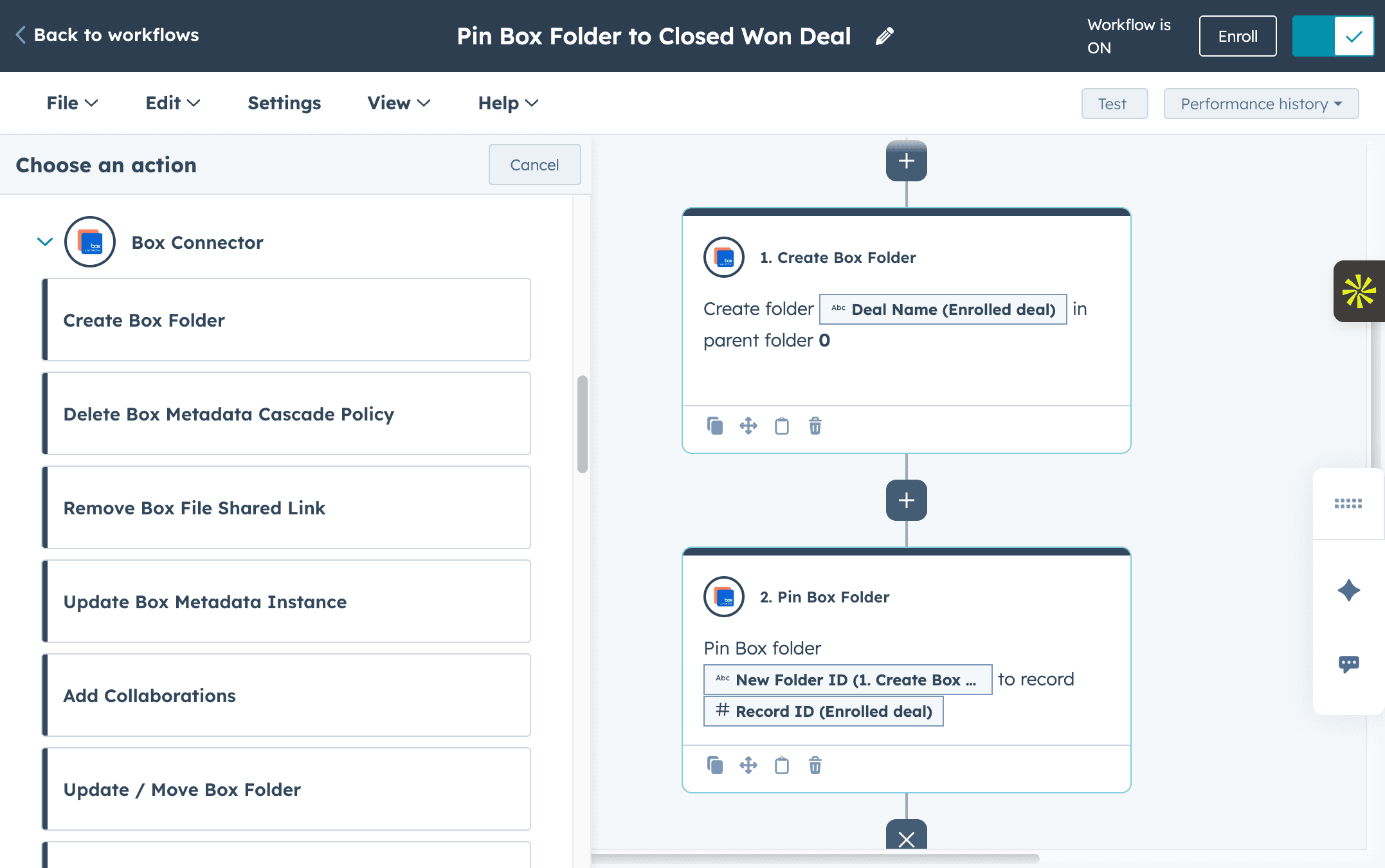
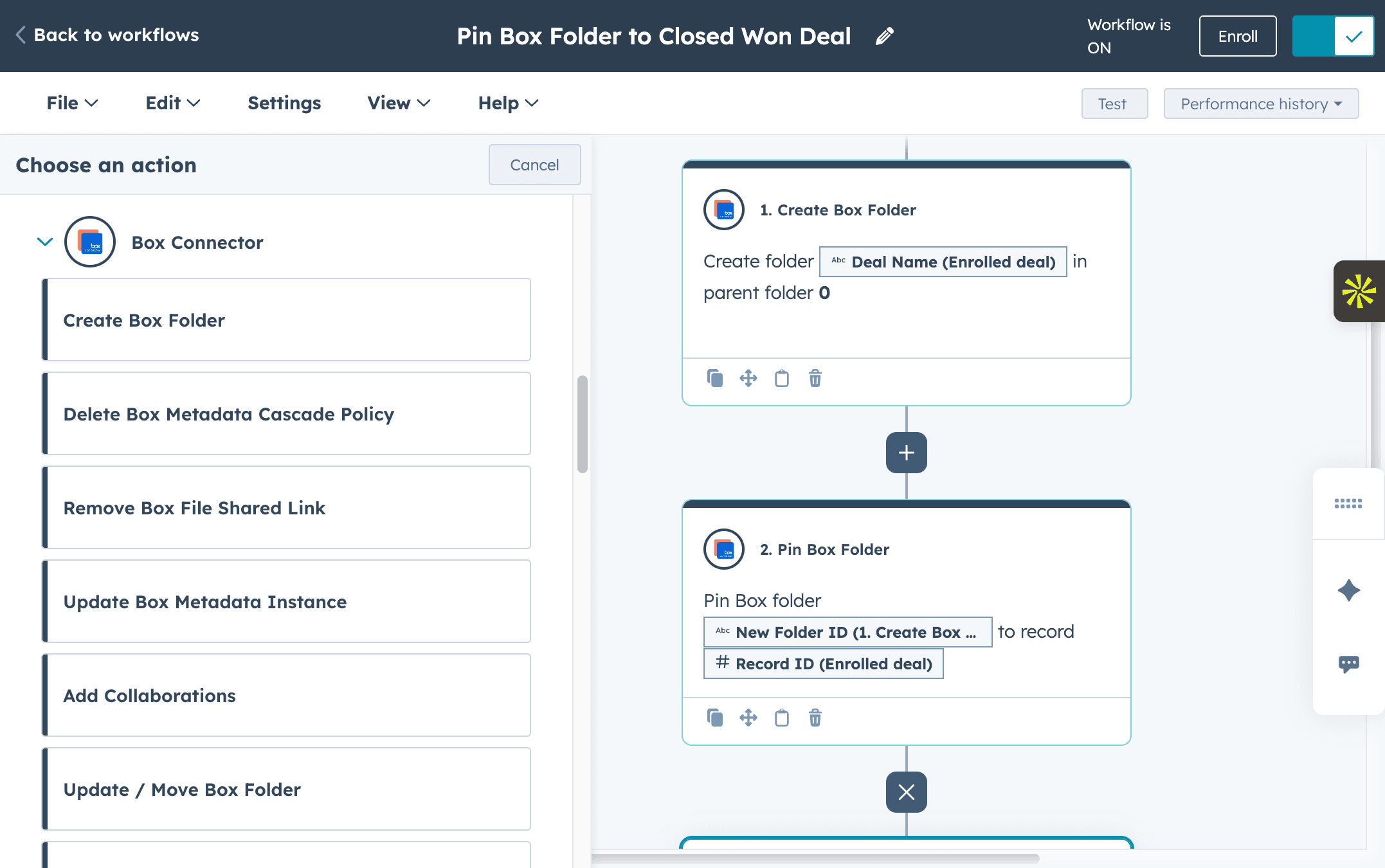
Use HubSpot workflows to create folders, organize files, collect documents, and trigger repeatable document actions.

Send Documents With Box Sign

Connect e-signature requests and signature activity to the HubSpot records and processes they support.

Support Secure Document Collaboration

Use Box-powered file management, permissions, security, and governance while bringing documents into HubSpot.

Support Secure Document Collaboration

Use Box-powered file management, permissions, security, and governance while bringing documents into HubSpot.

Product

Save hours

with

file automation

Automate Box folder creation, pinning, and organization directly from HubSpot. Eliminate repetitive tasks and stay organized.

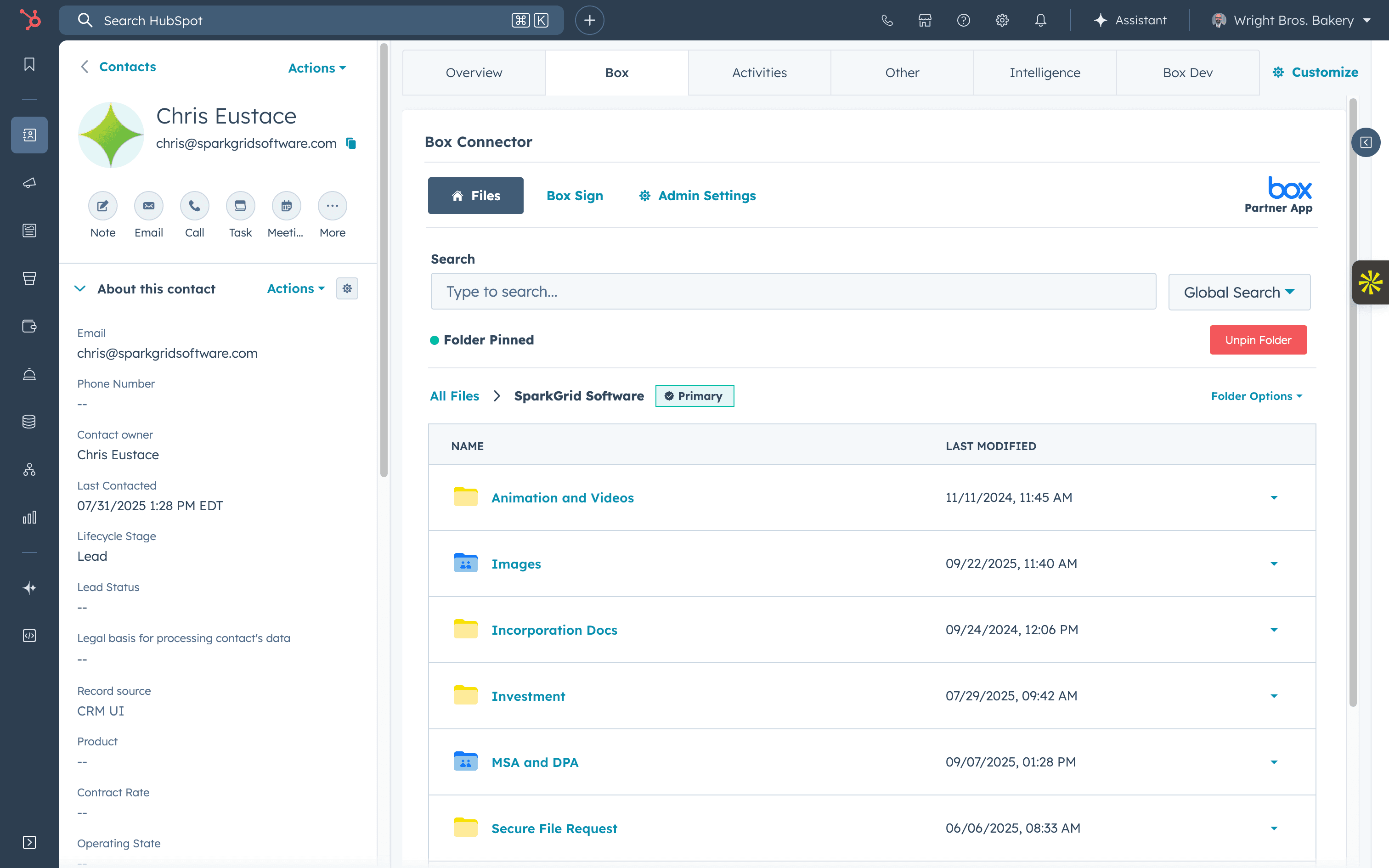
Centralize your files

in HubSpot

Access and organize every Box document where your team already works, no switching tools or searching across tabs.
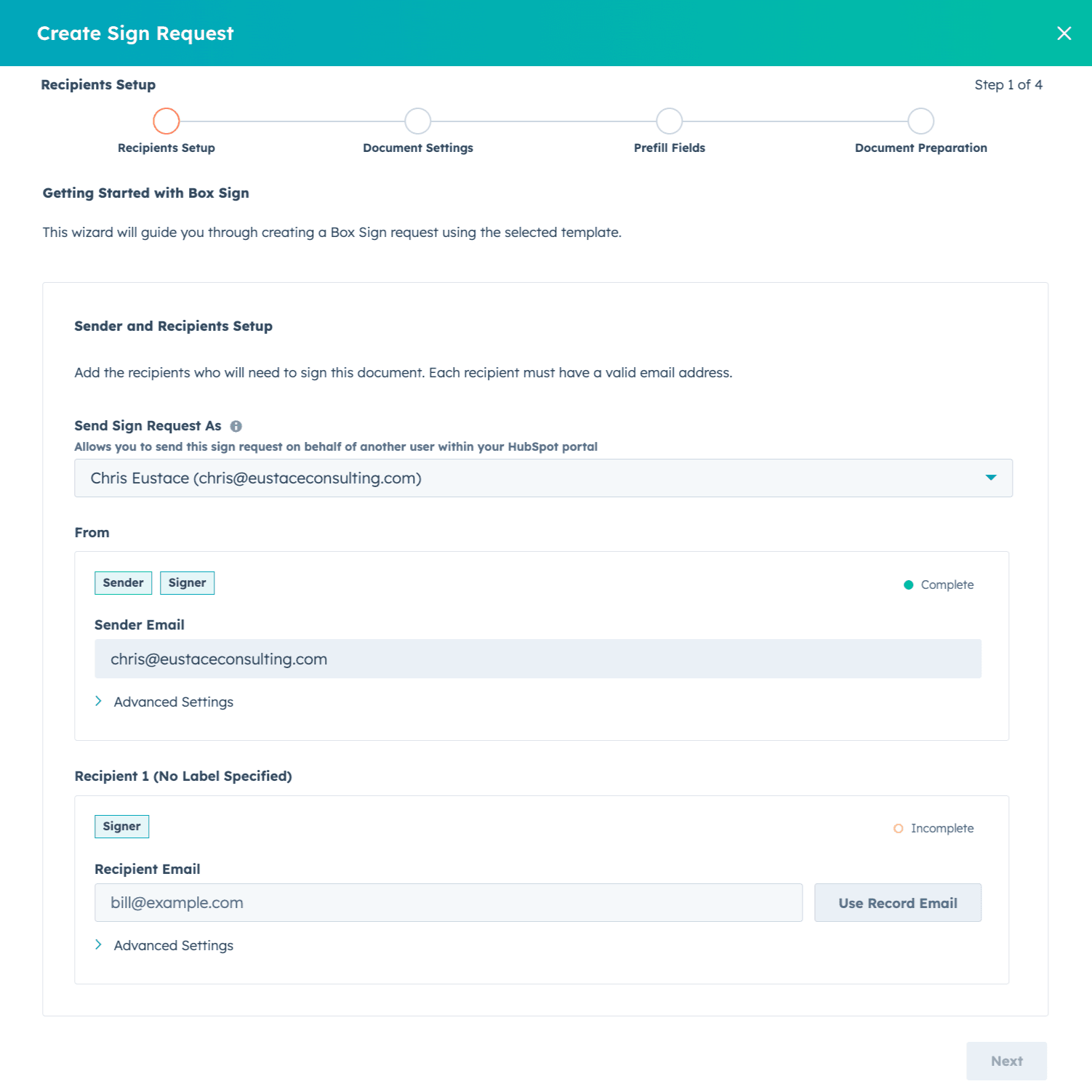
Send & sign

docs

effortlessly

Create, send, and track e-signature requests directly from HubSpot for a faster, personalized customer experience.

Smarter documents,

powered by

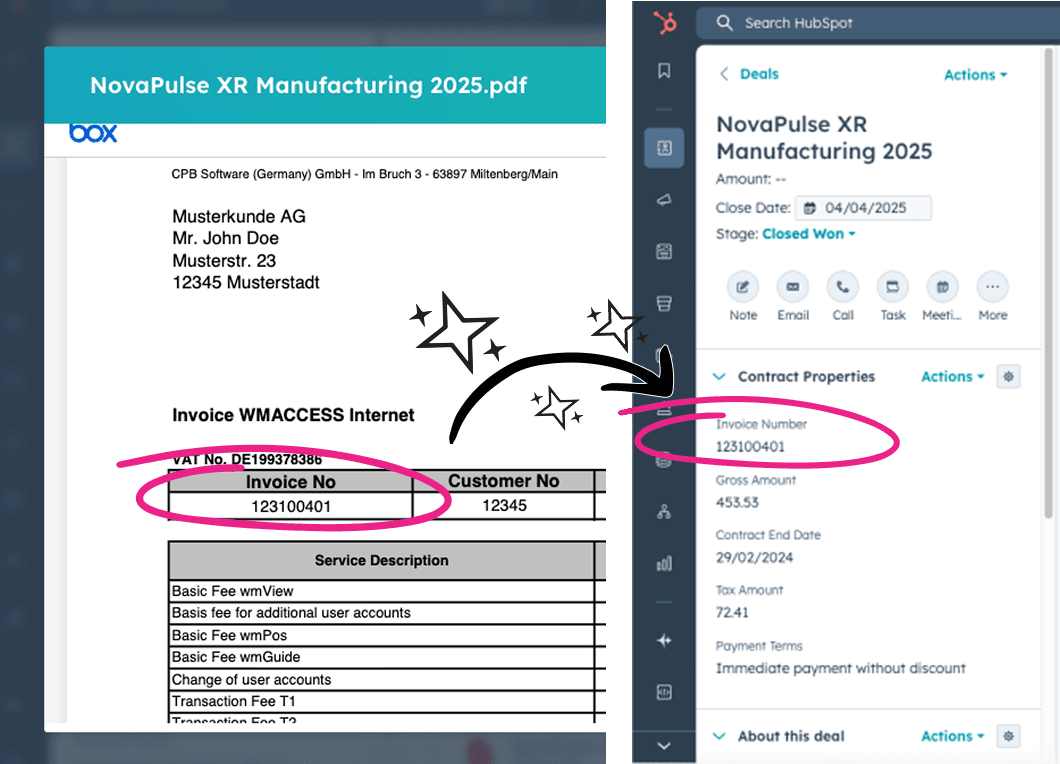
Box AI

Use Box AI to organize, rename, and extract key details from your documents automatically.
See Box Connector in action

Reduce the manual work behind document-heavy processes

  • Reduce repetitive folder and file administration

  • Keep customer documents connected to CRM records

  • Improve visibility across document workflows

  • Minimize outdated or duplicated files

  • Create more consistent onboarding and service processes

About

Built by people who understand Box, HubSpot,

and the workflows between them

SparkGrid, the company behind Box Connector for HubSpot, was founded by Chris Eustace, an experienced technology consultant with more than 17 years of experience helping organizations implement and optimize business systems.

That hands-on experience across HubSpot, Box, and complex technology environments helped shape Box Connector around real operational challenges, not just technical connectivity.

Why Organizations

Choose SparkGrid

Purpose-Built Box and HubSpot Expertise

Box Connector was created specifically to connect Box document management with HubSpot CRM processes, giving organizations a solution designed around the way the two platforms work together.

Built Around Real Business Workflows

The SparkGrid team brings years of hands-on technology and consulting experience to the product, helping organizations design workflows around actual customer, operational, and document-management processes.

Secure Document Workflows

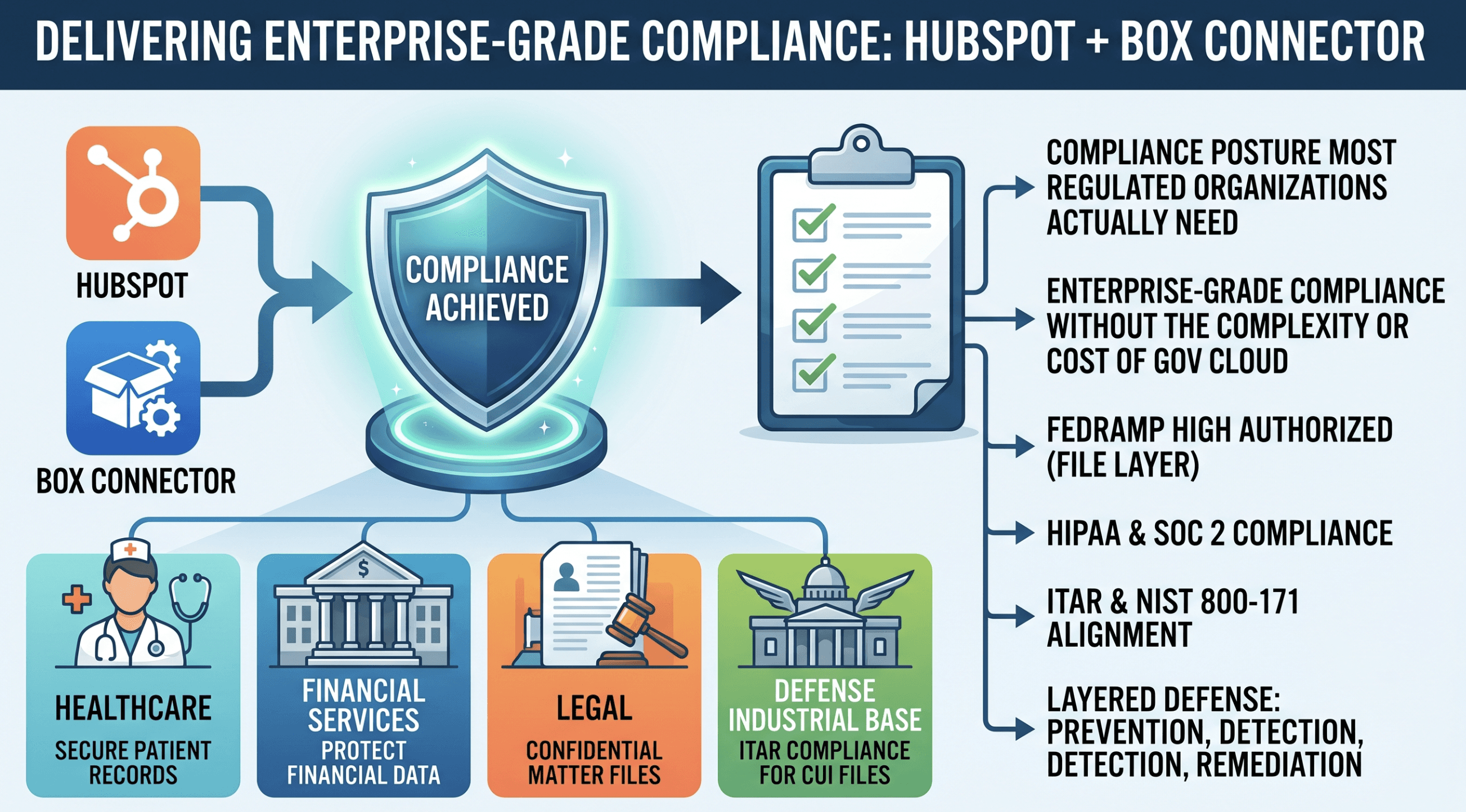
Box Connector allows teams to bring document activity into HubSpot while continuing to rely on Box-powered permissions, access controls, security, and governance.

Support for Compliance-Focused Teams

SparkGrid helps organizations create more consistent document processes while maintaining the controls required for regulated, sensitive, and document-heavy work. SparkGrid is currently SOC 2 Type I compliant, reinforcing its commitment to security and responsible data practices.

Recognized Across the Box and HubSpot Ecosystems

SparkGrid's partner relationships, awards, and marketplace presence demonstrate continued investment in building a trusted solution for organizations using Box and HubSpot

FAQs

Frequently asked questions about Box and HubSpot document workflows

Can Box integrate with HubSpot?

How can companies manage Box files inside HubSpot?

Can HubSpot automatically create folders in Box?

What document workflows can be automated between Box and HubSpot?

Can Box Sign be used with HubSpot?

How does Box Connector support secure document workflows?

Who is Box Connector best for?

How long does implementation take?

FAQs

Frequently asked questions about Box and HubSpot document workflows

Can Box integrate with HubSpot?

How can companies manage Box files inside HubSpot?

Can HubSpot automatically create folders in Box?

What document workflows can be automated between Box and HubSpot?

Can Box Sign be used with HubSpot?

How does Box Connector support secure document workflows?

Who is Box Connector best for?

How long does implementation take?

FAQs

Frequently asked questions about Box and HubSpot document workflows

Can Box integrate with HubSpot?

How can companies manage Box files inside HubSpot?

Can HubSpot automatically create folders in Box?

What document workflows can be automated between Box and HubSpot?

Can Box Sign be used with HubSpot?

How does Box Connector support secure document workflows?

Who is Box Connector best for?

How long does implementation take?

Testimonials

What teams say about

working with

SparkGrid

Box Connector saves us four or five hours a week in data entry of setting up folders.

Robbie M

Creative Director

@ToolKit Services

It's honestly a flawless integration.

Nic P

RevOps Architect

@Aptitude 8

Email attachments were a nightmare—files would get lost or outdated, creating confusion. With the integration, all documents are managed within HubSpot, ensuring the latest versions are always accessible and reducing the chaos. Box Connector automated the flow of data across platforms, streamlining everything and eliminating the need for constant manual updates.

Charlie F

CTO

@Sustainability Roundtable

What used to take hours each week now happens automatically, allowing our team to focus on strategic initiatives instead of admin work.

Alex S

COO

@Root Financial

I’ve been working with Chris and the team over at SparkGrid Software for more than a decade. The product and services they have provided to HubSpot Customers have been instrumental to HubSpot’s growth and customer retention. If you are looking for a fully integrated seamless experience within HubSpot, look no further than Box Connector.

Chris A

Mid-Market Sales Manager

@HubSpot

An even better integration than the native one between Salesforce and Box.

Jorge R

CEO

@OnPeak Energy

SparkGrid’s integration of Box, HubSpot, Box AI, and Box Sign delivers a unified, powerful platform for managing content, automating contracts, and enhancing collaboration. Teams can now securely store, share, and sign documents directly within HubSpot while leveraging AI to boost efficiency. This solution streamlines workflows and accelerates business growth, all with SparkGrid’s expertise guiding the way.

Dan O

Strategic Partnerships

@Box

Testimonials

What teams say about

working with

SparkGrid

Box Connector saves us four or five hours a week in data entry of setting up folders.

Robbie M

Creative Director

@ToolKit Services

It's honestly a flawless integration.

Nic P

RevOps Architect

@Aptitude 8

Email attachments were a nightmare—files would get lost or outdated, creating confusion. With the integration, all documents are managed within HubSpot, ensuring the latest versions are always accessible and reducing the chaos. Box Connector automated the flow of data across platforms, streamlining everything and eliminating the need for constant manual updates.

Charlie F

CTO

@Sustainability Roundtable

An even better integration than the native one between Salesforce and Box.

Jorge R

CEO

@OnPeak Energy

SparkGrid’s integration of Box, HubSpot, Box AI, and Box Sign delivers a unified, powerful platform for managing content, automating contracts, and enhancing collaboration. Teams can now securely store, share, and sign documents directly within HubSpot while leveraging AI to boost efficiency. This solution streamlines workflows and accelerates business growth, all with SparkGrid’s expertise guiding the way.

Dan O

Strategic Partnerships

@Box

Testimonials

What teams say about

working with

SparkGrid

Box Connector saves us four or five hours a week in data entry of setting up folders.

Robbie M

Creative Director

@ToolKit Services

It's honestly a flawless integration.

Nic P

RevOps Architect

@Aptitude 8

Email attachments were a nightmare—files would get lost or outdated, creating confusion. With the integration, all documents are managed within HubSpot, ensuring the latest versions are always accessible and reducing the chaos. Box Connector automated the flow of data across platforms, streamlining everything and eliminating the need for constant manual updates.

Charlie F

CTO

@Sustainability Roundtable

An even better integration than the native one between Salesforce and Box.

Jorge R

CEO

@OnPeak Energy

SparkGrid’s integration of Box, HubSpot, Box AI, and Box Sign delivers a unified, powerful platform for managing content, automating contracts, and enhancing collaboration. Teams can now securely store, share, and sign documents directly within HubSpot while leveraging AI to boost efficiency. This solution streamlines workflows and accelerates business growth, all with SparkGrid’s expertise guiding the way.

Dan O

Strategic Partnerships

@Box

Trusted Expertise

Across the Box and HubSpot Ecosystems

200+

box connector Installs

100%

Customer Satısfaction

1000s

HOURS Saved

Three steps to connected Box and HubSpot workflows

Step 1: Schedule a Demo

See how Box Connector can support your document processes and HubSpot setup.

Step 2: Build Your Workflow Plan

Identify the records, folders, permissions, signatures, and document actions that should work together.

Step 3: Launch and Automate

Configure the integration, enable your team, and begin reducing manual document work.

Looking for a quicker start? Start a free trial.

Ready to make Box and HubSpot work better together?

Reduce manual work, improve document visibility, and create more consistent customer and operational workflows with Box Connector for HubSpot.

SparkGrid Software developed Box Connector for HubSpot, helping organizations manage Box files, automate document workflows, support e-signatures, and connect document activity to CRM records.

Ready to make Box and HubSpot work better together?

Reduce manual work, improve document visibility, and create more consistent customer and operational workflows with Box Connector for HubSpot.

SparkGrid Software developed Box Connector for HubSpot, helping organizations manage Box files, automate document workflows, support e-signatures, and connect document activity to CRM records.

Ready to make Box and HubSpot work better together?

Reduce manual work, improve document visibility, and create more consistent customer and operational workflows with Box Connector for HubSpot.

SparkGrid Software developed Box Connector for HubSpot, helping organizations manage Box files, automate document workflows, support e-signatures, and connect document activity to CRM records.